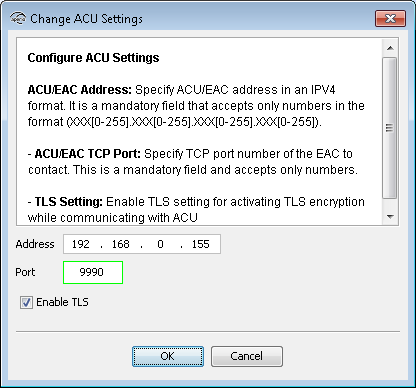
For correct settings contact your network/EAC administrator:
- Address: Network address for the EAC/ACU on the network: For example 192.168.0.155.
- Port: The TCP port of the EAC use for communication. Default value is 9990.
- Enable TLS: This setting provides secure communication between the EAC/ACU and the IP communication hub. The default value is enabled.
In order to establish a secure communication between the communication hub and the ACU,
TLS is used. The sequence for connecting when in Manufacturer Mode is the following:
- The Hub makes a TCP connection to the ACU.
- ACU and Hub will try to establish a TLS session. During TLS handshake, the ACU sends its certificate to the Hub.
- Hub validates and stores the certificate.
TLS specifies a number of possible cipher suites, but currently only TLS_RSA_WITH_AES_128_CBC_SHA is supported by the Hub. If a certificate using another cipher suite is used by the ACU, the Hub disconnects the TCP connection.
When in Customer Mode, The communication hub will only accept a TLS session where the previously stored certificate is presented. If any other certificate is presented, the communication hub will disconnect the TCP connection.